
Zapier
Connect any of the 8,000+ apps in Zapier to AlertHub and send alerts without writing code. The integration is currently available via public invite.
👉 Accept the AlertHub Zapier invite
How it works
- Connect Zapier to your AlertHub project with the project secret key.
- Add the Send a New Alert action and fill in title, description, level, and source.
You can map values from previous Zap steps (a new Stripe charge, a Typeform submission, a Google Sheets row, etc.) into those fields.
Step 1: Connect AlertHub
-
Open the AlertHub Zapier invite and click Accept Invite & Build a Zap.
-
In your Zap, add Alerthub as an action (look for Alerthub (1.0.0) — it may show as Invite Only).
-
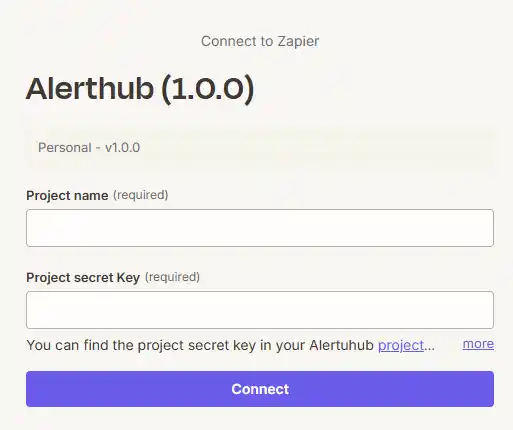
When prompted to connect an account, enter:
- Project name — a label for this connection (e.g.
Production). - Project secret key — the One-Way Secret Key from your AlertHub Project Settings.
- Project name — a label for this connection (e.g.
-
Click Connect.
Step 2: Send a New Alert
Setup
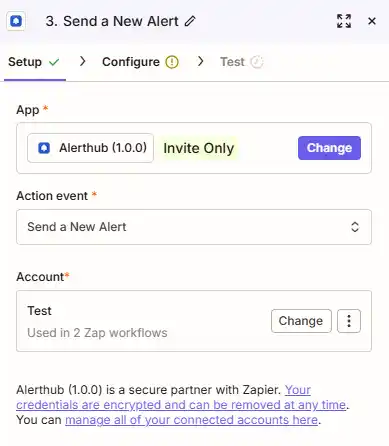
Choose the action and the AlertHub account you just connected:
- App: Alerthub (1.0.0)
- Action event: Send a New Alert
- Account: the project you connected in Step 1
Configure
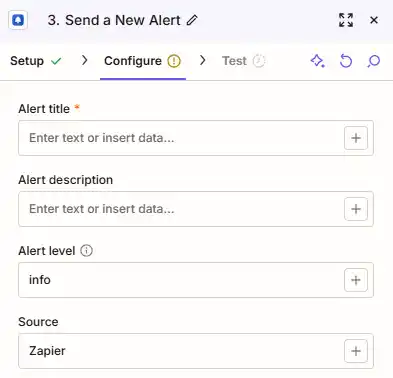
Fill in the alert fields. Use the + button on each field to insert data from earlier steps in the Zap.
| Field | Zapier key | Required | Notes |
|---|---|---|---|
| Alert title | ah_title | Yes | Short headline shown in the dashboard and notifications. |
| Alert description | ah_description | No | Extra context. Can include dynamic data from previous steps. |
| Alert level | ah_level | No | info (default), warning, or critical. |
| Source | ah_source | No | Label for where the alert came from (e.g. Zapier, Stripe, Typeform). |
Tip: Only warning and critical alerts are forwarded to Slack, Telegram, WhatsApp, and other destinations.
infoalerts are stored in the dashboard.
Test
Click Test to send a sample alert. If it succeeds, open your AlertHub dashboard — the alert should appear immediately.
Example Zap
A typical Zap looks like this:
- Trigger — e.g. Stripe New Payment, Typeform New Entry, or Google Sheets New Row.
- Action — Alerthub Send a New Alert:
- Title:
New payment: {{amount}} {{currency}} - Description:
Customer {{email}} paid via Stripe. - Level:
info - Source:
Stripe
- Title:
Turn the Zap on. From then on, matching events become AlertHub alerts and can be routed to Slack, Telegram, email, or any other destination.