
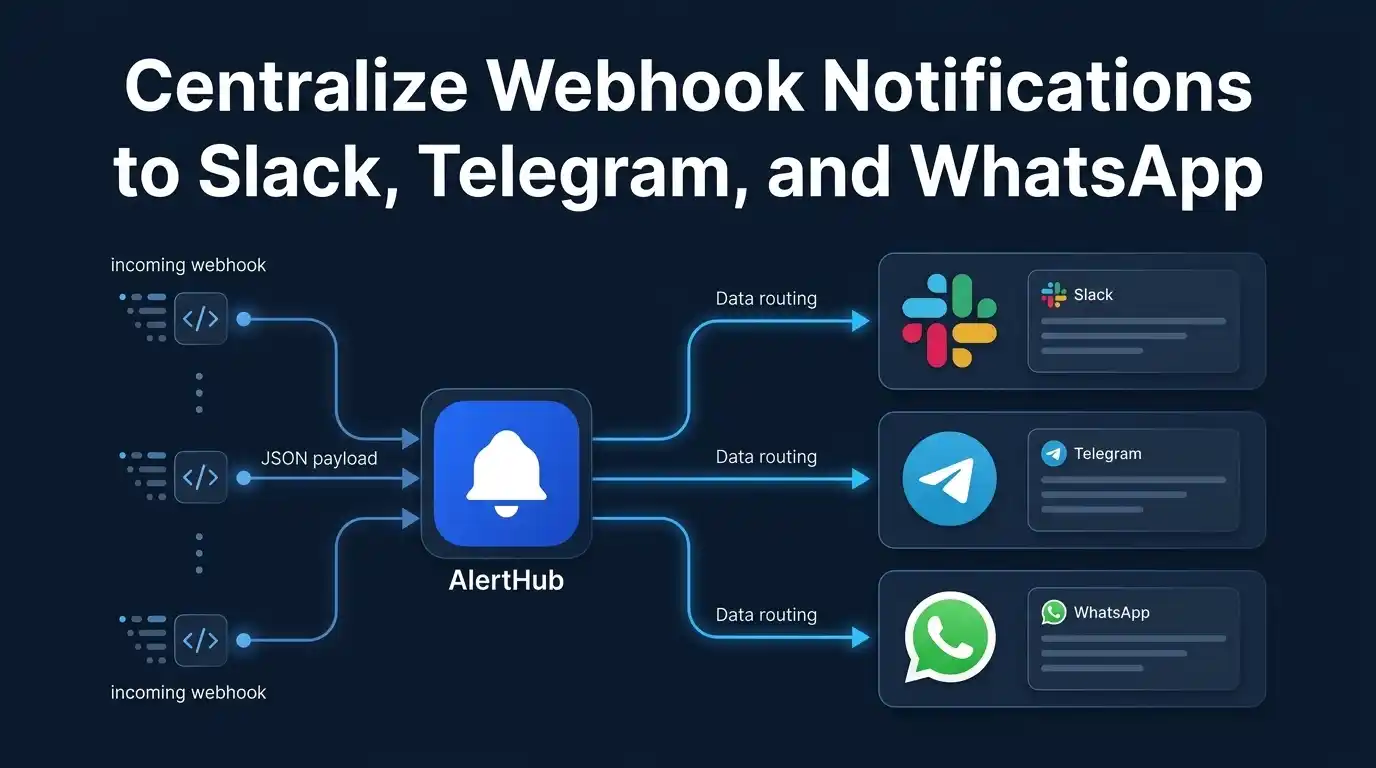
The other half of “centralize webhook notifications” is the last mile. If Stripe holds a Slack incoming-webhook URL, GitHub holds a second, and n8n ends every scenario with a Telegram node, you have not centralized anything. You have copied destination secrets into every vendor.
AlertHub flips that. Sources POST once to https://api.thealerthub.com/sendAlert. Destinations live under the project Connections tab. Add Slack, Telegram, WhatsApp, email, Discord, Teams, Google Chat, Mattermost, Gotify, or ntfy without going back to Stripe.
Many sources into one feed: centralize webhook notifications. Switching Slack to Teams later: total flexibility. This post is fan-out — one ingest, several channels at once.
Only warning and critical leave the dashboard. Info is history. That gate is the same for every destination, including WhatsApp quota — levels.
AlertHub does not route “Stripe to Slack, GitHub to Telegram” on one project. If it pages, every connected channel gets it. Split noise with level at the source, or with a second project.
Destinations you connect once
| Destination | How you link | Notes |
|---|---|---|
| Slack | AlertHub app (@AlertHub connect) or incoming webhook | Incoming webhook if you cannot install the app |
| Telegram | @Alerthubapp_bot /connect + 6-digit code | Fastest phone setup |
| One-time code from Connections (Pro or higher) | Warning/critical only; monthly quota | |
| Address on the Email card | Paper trail; not the same as email ingest | |
| Discord / Teams / Google Chat / Mattermost | Incoming webhook on that card | Same warning/critical gate |
| ntfy / Gotify | Topic URL or https://your-gotify/message?token=… | Gotify must be public HTTPS |
Catalog: Destinations.
Setup (once)
- Create a project at app.thealerthub.com. Copy the secret key into sources only — never into Slack’s URL field on a vendor.
- Open Connections. Link Telegram (test a
warningfrom the dashboard or API). - Add Slack for the team and, if you are on Pro, WhatsApp for the founder phone. Confirm a second
warninghits all of them.
Sources keep using the Ingestion API or the Webhook Builder.
Pattern 1: Team channel + phone
Slack or Teams for handoff. Telegram, ntfy, Gotify, or WhatsApp for the person who can act. Same ingest. This is the combo in on-call on ntfy/Gotify with Slack. WhatsApp is the Pro variant of that pocket — WhatsApp Pro.
Do not put paid Shopify volume at warning if WhatsApp is connected: quota is monthly and every warning counts.
Pattern 2: Kill the Slack URL in the vendor
Stripe, GitHub, Shopify, Vercel, and UptimeRobot should store an AlertHub URL (ah_key + ah_title + ah_level). When the company leaves Slack, you disable the Slack card. The vendor webhook does not change.
WordPress is the same idea: the plugin holds the project key, not a Telegram bot token.
Pattern 3: Automation tools as sources, not as routers
n8n, Zapier, and Make should Send a New Alert (or HTTP POST to ingest) and stop. Do not keep a Slack node and an AlertHub node for the same event. Zapier invite: Zapier docs.
Ideas to squeeze more value
- Default new sources to info. Watch the feed for a week, then promote the rows that deserve a ping.
- WhatsApp is not the archive. Quota and disappearing chats are why the inbox exists.
- Rotate Slack, not Stripe. Incoming-webhook URLs belong on the Slack card so you can replace them without touching every SaaS dashboard.
- Agencies. One project (and optional WhatsApp number) per client. Members cannot link or unlink WhatsApp.
FAQ
Can two people on one project get WhatsApp?
Linking binds the project to the phone that sent the code. A second person uses Slack, Telegram, or email on the same project — or a second project.
Do info alerts use WhatsApp quota?
No. Info is not delivered to WhatsApp or any other channel.
Is WhatsApp on Free?
No. Pro or higher, with a monthly allowance greater than zero. The card shows Premium until you upgrade. Pricing: app.thealerthub.com/pricing.
Next steps
Link Telegram, send one test warning, then add Slack. Point Stripe or GitHub at ingest afterwards — not the other way around.
Related: many sources, one feed · WhatsApp Pro · alert levels